
The DTF gang sheet, without building it by hand
Placing 230 logos on a 60 cm roll by hand, with the right gaps, then redoing the white channel: half a day. DTFForge computes the layout, builds the sheets in Photoshop and outputs the TIFF your RIP expects.
What a hand-built gang sheet really costs
Film is paid by the metre. A rough layout leaves holes, a design placed the wrong way uses one more row, and a forgotten margin loses the whole sheet at cutting. On a large order, the difference between a well-nested sheet and one built by eye is counted in metres.
And every sheet then needs the same sequence in Photoshop: flatten, select, choke, create the spot colour channel, save as TIFF with the right boxes ticked. A missed step shows up at printing, when the film is already used.
The gang sheet with DTFForge
- Add the designs and the quantities
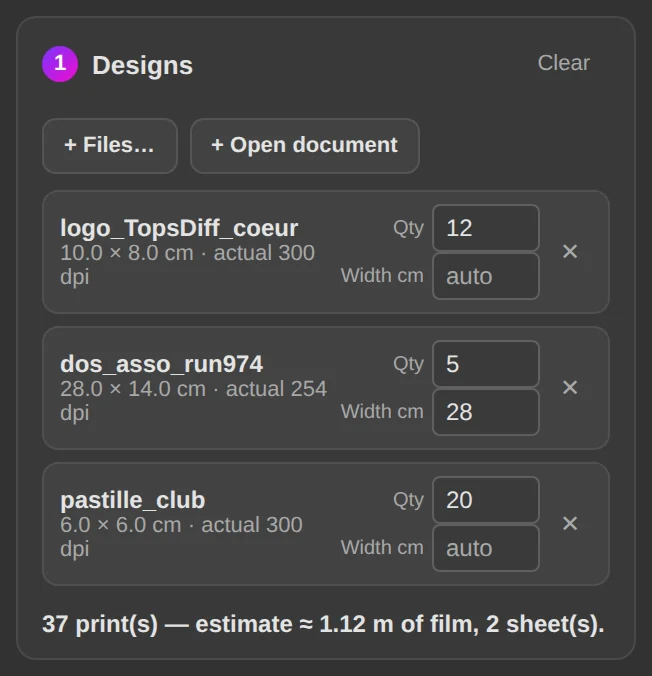
Gang sheet tab, + Files…: PNG, PSD, JPG or TIF, or the open document. For each one, the quantity and, if needed, the print width in cm. The estimate immediately announces the metres of film and the number of sheets, computed from the real layout.
- Set the film width, margins and length
Film width and resolution in the settings; edge margin and spacing between designs to the millimetre; maximum length of a sheet. Rotate designs to save film tries several orientations and keeps the shortest: rotation can never make the sheet longer.
- Build
Build gang sheet opens the sheets in Photoshop, at the film width, cropped to the length used. Copies of the same design are smart objects: the file stays light. With Merge identical sheets (one “×12” tab instead of 12), identical sheets are built only once, in a tab named “×19” to be printed 19 times.
- Finish for the RIP
Three buttons: Flatten layers, Generate the “Spot_1” channel, Export to TIFF. The white channel is choked by 1 px, named to suit your RIP (Spot_1, White…), and the TIFF is read back to confirm the channel is in it. The file name carries the customer, the date, the length and the number of prints.
The Gang sheet tab in the guide →
What you get
- Sheets nested as short as possible, several layouts tried every time
- The number of sheets and the metres of film known before you start
- One tab per different sheet, marked “×n” when it repeats
- The TIFF with white channel ready for the RIP, named with no room for error
Frequently asked questions
Which film width and maximum length?
Any: 30, 40, 60 cm or your own, in centimetres. The maximum length of a sheet is yours to set (100 cm by default); beyond it, DTFForge creates one more sheet. Photoshop limits a document to 300,000 pixels on a side, i.e. 25 m at 300 dpi.
Do the designs need to be prepared first?
No. Each design is set to 300 dpi and trimmed to its transparent edges when the sheet is built. You can also ask for the semi-transparency clean-up and the background removal with the settings of the Prepare tab, for every design on the sheet at once.
What if Photoshop runs out of memory on a large order?
Sheets are built one at a time, checked and cropped before the next. If Photoshop stops, the finished sheets stay open and complete, and the message says where it stopped. Merging identical sheets reduces the number of open documents anyway.
Build your next order with DTFForge
The Gang sheet builder and White underbase TIFF modules cost €49 each, one-time payment, lifetime licence. The complete bundle of all eight modules is €299. The 7-day free trial unlocks everything.